Use your AirPods, AirPods Pro, or AirPods Max to mute and unmute.
How do I mute my microphone with my AirPods?
First, you’ll need to enable the feature in Mic Drop.
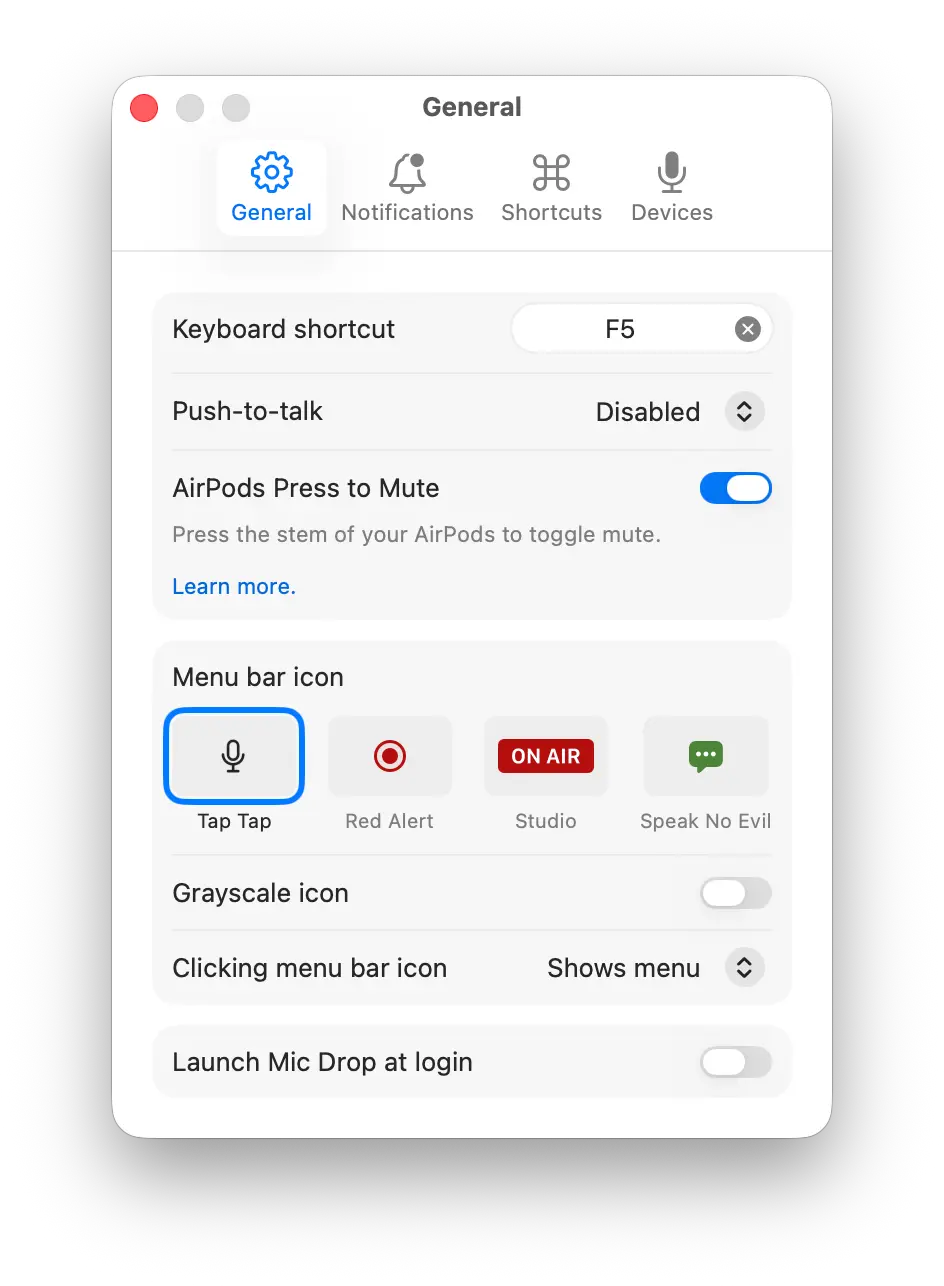
- Open Mic Drop from the menu bar, then go to Settings > General.
- Toggle AirPods Press to Mute.
- You’re all set!
With Press to Mute enabled, you can toggle your mute by pressing the force sensor on the stem of your AirPods.
To mute yourself, press the force sensor on the stem of your AirPod. To unmute yourself, press again.
Help! When I press the force sensor, my AirPods just toggle transparency mode/activating Siri!
Make sure you’re just using a single press to toggle the mute (eg. the same way you would play/pause media). A long press (press + hold) will toggle the transparency mode/activate Siri instead.
Why is macOS sending banner and/or audible notifications when I use Press to Mute?
Unfortunately, this is a side effect of the Press to Mute API is macOS, and there is no way for us to disable these notifications whatsoever.
The banners will appear even if you’re in Do Not Disturb Mode. They also appear in other apps that use Press to Mute (Facetime, Teams, WhatsApp), and cannot be disabled there either.
We’ve filed a feedback with Apple requested that there be some way for users to disable these banners. You can file your own feedback using the Feedback Assistant on your Mac or this form.
If you have UI system sounds enabled in System Settings > Sound > Play user interface sound effects, you will also hear the system-provided sounds. In this case, we’ve disabled the Mic Drop audible notifications so you won’t hear two notifications. You can also select to use the system-provided sounds in Mic Drop (Settings > Notifications > System Default) so the sound is always consistent.
Please note that system notifications (both the banners and the sounds) can be delayed. This means that they may appear to be out of sync with Mic Drop’s actual mute state. Rest assured, your mic is always toggled immediately. We recommend using Mic Check or the menu bar icon as a source of truth.
Do my AirPods support Press to Mute?
Any AirPods with a stem control will support the Press to Mute feature:
- AirPods Pro 2+
- AirPods 4
- AirPods Max 1+ (Using the Digital Crown button)
Some other Apple headphones that we’ve confirmed work with this feature:
- PowerBeats Fit (Using the Play/Pause button)
Does my video app support Press to Mute?
Due to limitations in macOS, some other apps override Mic Drop’s Press to Mute control. Unfortunately, there’s nothing we can do on our end to avoid this—it’s up to the other apps to add a setting that lets you disable their AirPods support.
Supported apps:
- Google Meet
- Signal
- Telegram
- Zoom1
Unsupported apps:
- Facetime
- Microsoft Teams
- Phone
If we detect that you’re using an app that will override Mic Drop’s Press to Mute, we’ll display a notification and disable the feature while it’s open. This ensures that the app’s own Press to Mute feature functions as expected while you’re using the app. Once you’ve finished using the app, we’ll re-enable Press to Mute in Mic Drop.
All other Mic Drop features and settings will continue to work as expected.
If you run into any additional compatibility issues, please drop us a line and we’ll do our best to help out!
Still have questions? We’re here to help! Contact us